Create a member group
A Microsoft Teams member group allows you to create a conceptual "BOT group" consisting of the Recorder and RAPS node, and associate them with the data source.
Before you begin
Create a Microsoft Teams application data source.
Procedure
-
Go to Recording Management.
-
Under Data Sources, click Settings.
-
Select the Microsoft Teams data source and then click Member Groups.
-
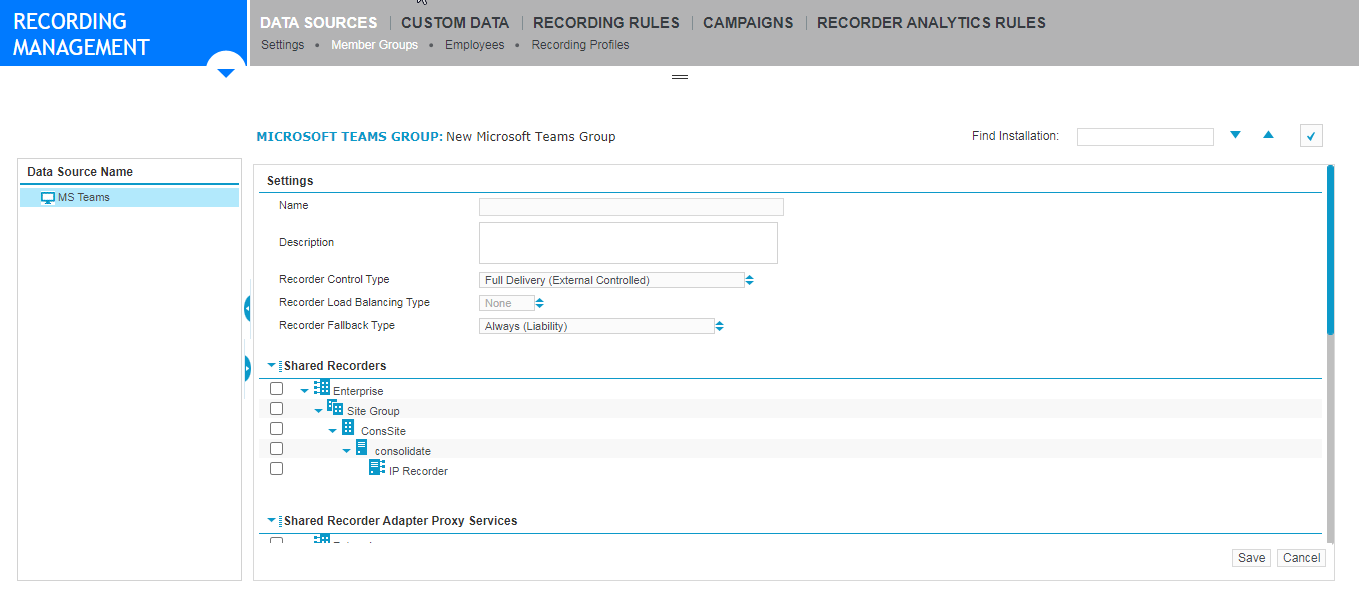
Click Create to create a Microsoft Teams Group.
-
Under Shared Recorders, select the Recorder server running on Microsoft Azure.
-
Under Shared Recorder Adapter Proxy Services, select the IP Recorder node to which you previously assigned the Recorder Adapter Proxy Adapter Services role.
-
Complete the remaining settings.
-
Click Save.
Microsoft Teams member group settings
What to do next