Create tenant role templates
If tenants are provisioned without a license, tenant roles and privileges are managed by the Service Provider.
To create tenant role templates in the Tenant template organization, copy the default roles from the root organization and use the Roles and Privileges Reference Tool to make privilege modifications.
Before you begin
Create organizations to store activities, queues, and roles
Procedure
-
Go to User Management. Under Security, select Roles Setup.
-
Copy all roles from the root organization to the Tenant template organization, except for the following roles that are used for system management purposes only and are not meant to be used by tenants:
-
Administrator
-
Archive Manager
-
Enterprise Manager Admin
-
Import Export Manager Admin
-
Import Export Manager User
-
Installation and Setup Role
-
Operational System Management
-
Retail Employee
-
Retail Manager
-
Retail Regional Manager
-
System Monitor Admin
-
System Monitoring with Acknowledgment
-
System Monitoring without Acknowledgment
-
Under the Tenant template organization, rename the copied roles using the following syntax:
Original name+ Template
For example, rename Copy of Manager 1 to Manager Template.
-
Use the Roles and Privileges Reference Tool to identify specific multi-tenant enabled privileges so that the privileges are appropriate for tenants, and make the relevant modifications.
-
For any copied role that is flagged as an administrator role (as indicated in the Is Admin column), edit the role and remove the Is Admin Role flag.
-
Under the Tenant template organization, create a custom Tenant Administrator role to serve the functionality of user management not included in other roles.
-
For the Tenant Administrator role, set relevant privileges according to the Roles and Privileges Reference Tool and enable Secure Fields:
-
Set, at a minimum, the privileges specified below (located in the Framework section).
-
Under Forecasting and Scheduling, set the Edit Forecasting and Scheduling Calendar privilege.
-
Enable any needed administration privilege indicated as multi-tenant enabled in the Roles and Privileges Reference Tool.
-
Enable View and Edit of all Secure Fields.
-
Click Save.
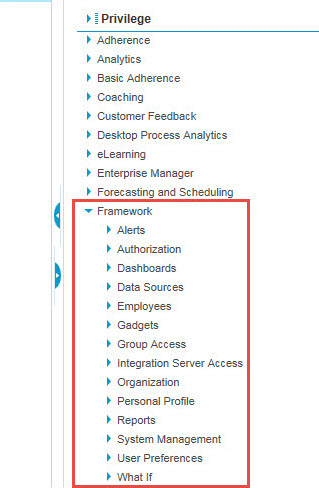
|
Sub-section |
Privilege |
|---|---|
|
Authorization |
View User Information |
|
Authorization |
Configure Access Rights |
|
Authorization |
Edit User Information |
|
Authorization |
View Access Rights |
|
Authorization |
View User Roles |
|
Authorization |
Configure User Roles |
|
Employees |
View Employees |
|
Employees |
Add/Edit/Terminate Employees |
|
Employees |
Delete Employees (Permanently) |
|
Employees |
Import Employees |
|
Employees |
Export Employees |
|
Employees |
View Employees By Group Scope |
|
Group Access |
Edit Group Members |
|
Group Access |
Configure Group |
|
Group Access |
View Group |
|
Organization |
View Activities |
|
Organization |
Add Activities |
|
Organization |
Delete Activities |
|
Organization |
Edit Activities |
|
Organization |
View Employee Types |
|
Organization |
Configure Employee Types |
|
Organization |
View Holidays |
|
Organization |
Configure Holidays |
|
Organization |
View Job Titles |
|
Organization |
Configure Job Titles |
|
Organization |
View Organization |
|
Organization |
Configure Organization |
|
Organization |
Create Organization |
|
Organization |
Delete Organization |
|
Organization |
View Skills |
|
Organization |
Configure Skills |
|
Personal Profile |
View Personal Profile |
|
User Preferences |
Customize Navigation |
Create a host organization and Service Provider Administrator (SPA) role
Roles and privileges overview (Workforce Optimization User Management Guide).
Roles and Privileges Reference Tool