Create employees for agents
To capture the conversations of agents from the Verint Messaging platform, create an employee account for each agent. Then associate the employees to the Verint EDM
Before you begin
-
Your EDM capture solution is deployed, has a data source, and a default employee.
-
From the Verint Messaging agent application, get a list of agents and their Agent IDs.
Procedure
-
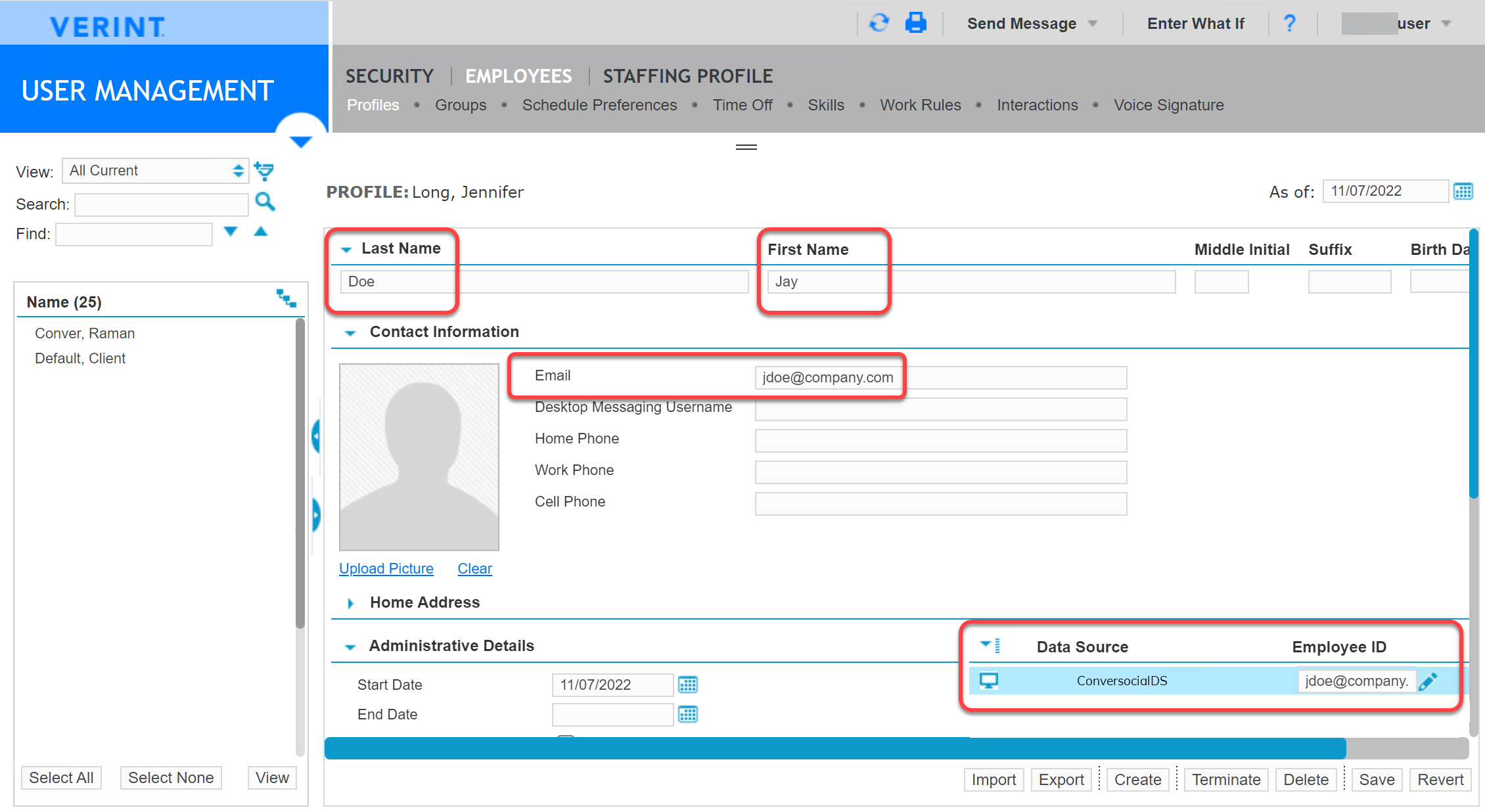
In Verint, go to User Management, under Employees, select Profiles.
-
Add employee accounts for each agent in Verint Messaging.
The minimum required fields are: Last Name, First Name, Email, and Organization.
-
Assign each employee to the Conversocial data source:
-
Under Administrative Details, under Data Source, find the data source for Verint Messaging (Conversocial).
-
In the Employee ID field, enter the agent's ID in Verint Messaging; usually the email address.
-
-
Click Save.
What to do next
Search and replay interactions
Workflow: Configure EDM Capture for Verint Messaging
Create Employees and Add Employee IDs (Recorder Configuration and Administration Guide)