Introduction to the DPA User Interface
Use the Desktop and Process Analytics user interface to analyze DPA information, administer DPA applications, and manage DPA configuration profiles.
The DPA application includes a number of WFO-native web pages and a component that opens in a separate window. The DPA application supports accessibility in all aspects, including Collections. DPA Path, Collections, and Reports (except where specified) are part of
DPA User Interface
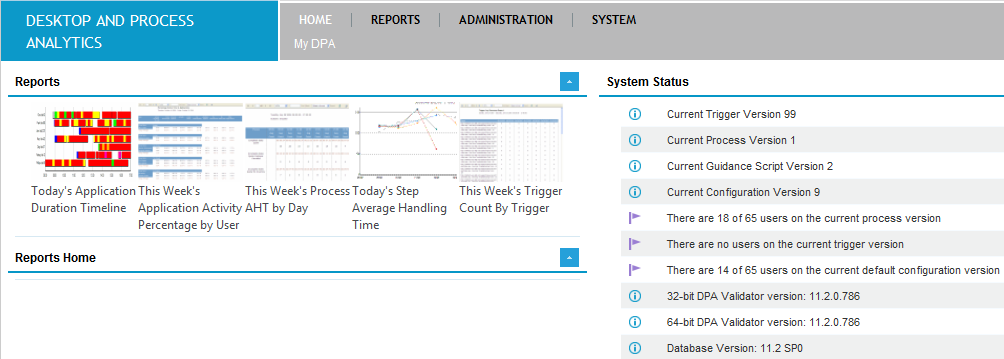
DPA UI tabs
|
Tab |
Description |
|
|---|---|---|
|
The My DPA tab under the Home menu |
The home tab contains options that enable you to personalize the content you see when you open DPA. |
|
|
Reports Home |
A list of saved favorite reports. Add reports here by selecting the Save to Home Page option after generating a report. |
|
|
System Status |
View the current DPA system information and status messages, and export the system state to send to the Support organization when troubleshooting. |
|
|
Reports |
The reports tab contains options that enable you to generate and store DPA reports. |
|
|
Application Analysis Reports |
Enables capturing and analyzing desktop application activity and usage, and displaying that information per user. |
|
|
Event Triggering Reports |
Enables analyzing fired triggers for applications, and their frequency. |
|
|
Process Analysis Reports |
Enables analyzing key metrics of business processes. |
|
|
Custom Reporting |
Generate custom reports based on customized DPA database tables called ‘custom extracts’. |
|
|
Administration |
The administration tab contains options that enable you to manage DPA triggers and processes. |
|
|
Triggers |
DPA contains a mechanism to fire triggers when prompted by Window events that occur on a monitored desktop. |
|
|
Modules |
Create application modules to further specify the entities in which employees are working, including application components, web sites, forms for specific customers. |
|
|
Commands |
Define trigger commands to execute a program or internal DPA function when trigger criteria are met. |
|
|
Steps |
Define a sequence of events or triggers. |
|
|
Processes |
Define a sequence of steps. |
|
|
Scripts |
DPA Next Best Action (DPA NBA) scripts are used to guide employees on how to proceed with a specific customer in real time. DPA Process Guidance Scripts provide a mechanism to automate and guide tasks for the user, including propagating content from one application to another. |
|
|
Applications |
The applications that DPA monitors on employee desktops (such as a CRM system, customized forms, office applications and web browsers) are monitored by DPA for the purpose of application activity reporting, application analysis, application event triggering, process discovery, and guidance. |
|
|
Trigger Variables |
A trigger variable stores data obtained in triggers. This data, once stored, can be used in any other trigger, either as a passback value, or as part of the criteria that determines whether the trigger will fire. |
|
|
System |
The system tab contains options that enable you to manage configuration profiles and their assignments, manage trace log files, and view audit trails. |
|
|
Configuration |
Contains configuration options that enable you to manage and configure profiles and assignments. |
|
|
Recording |
Contains configuration options to manage recording class of service, attributes and custom data. |
|
|
Users |
A read-only list of users following synchronization with Enterprise User Management every 5 minutes. Employees with multiple FQDN user names are listed once per user name, with the same display name. Configuration Version: Displays the active trigger, process and default configuration profile versions in use by each user. |
|
|
Computers |
The Computer tab contains a read-only list of the computers, their display name, current Trigger and Process Version, and the date and time stamp of when the machine last sent data to the server. The Version Info tab lists the release version numbers of the DPA client files. This can be used to confirm whether a particular machine is running up to date DPA software. |
|
|
Client Trace Files |
DPA client trace log file management |
|