Build and distribute language model (Connected mode)
Build the language model to incorporate the changes in the Phonetics Boosting project into the model, and distribute the boosted language model to the Speech Transcription servers.
Build and distribute boosted model
You can stop an ongoing build, but cannot restart it.
After building the model, it is recommended to distribute the model. Closing the application without distributing the model, deletes the new model.
Build status updates
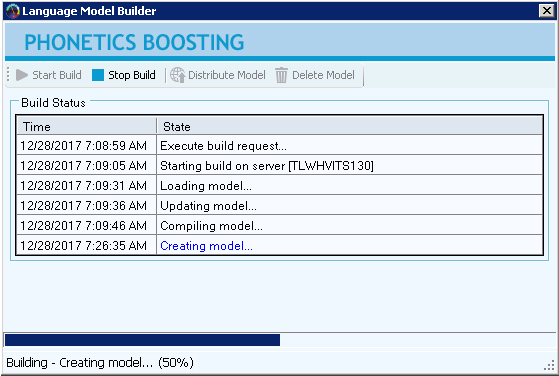
The Build Status table displays the states of the current process or action in real time, such as model build, load, and compilation states, quality assessment, publish and delete.
Transcription server name
The Build Status table displays the name of the Transcription Server on which the language model is being built. Make a note of the server name displayed in the line Starting build on server <server_name>. The name is required for rollback, if needed.
Before you begin
Add terms and phrases to project (Connected mode)
Procedure
-
On the toolbar, click Build Model.
The Language Model Builder window appears.
-
To start the build, click Start Build.
The Build Status table displays the state of the current process or action.
The progress bar shows the status of the build process.
-
Make a note of the server name in starting build on server <server_name>, in case you may want to roll back the language model.
-
To stop the build, click Stop Build.
-
After language model is built successfully, do one of the following:
-
To distribute the language model to all the Speech Transcription Servers, click Distribute Model.
-
To delete the new language model, click Delete Model.
-
What to do next