Avaya Aura CM integration with Capture Verification
For customers with Avaya Aura Communication Manager (CM), Capture Verification verifies calls recorded by a recorder product against Avaya Call Detail Records (CDRs).
Capture Verification uses its Collector to copy CDRs from the Avaya Aura CM environment so that it can verify recordings against the CDRs.
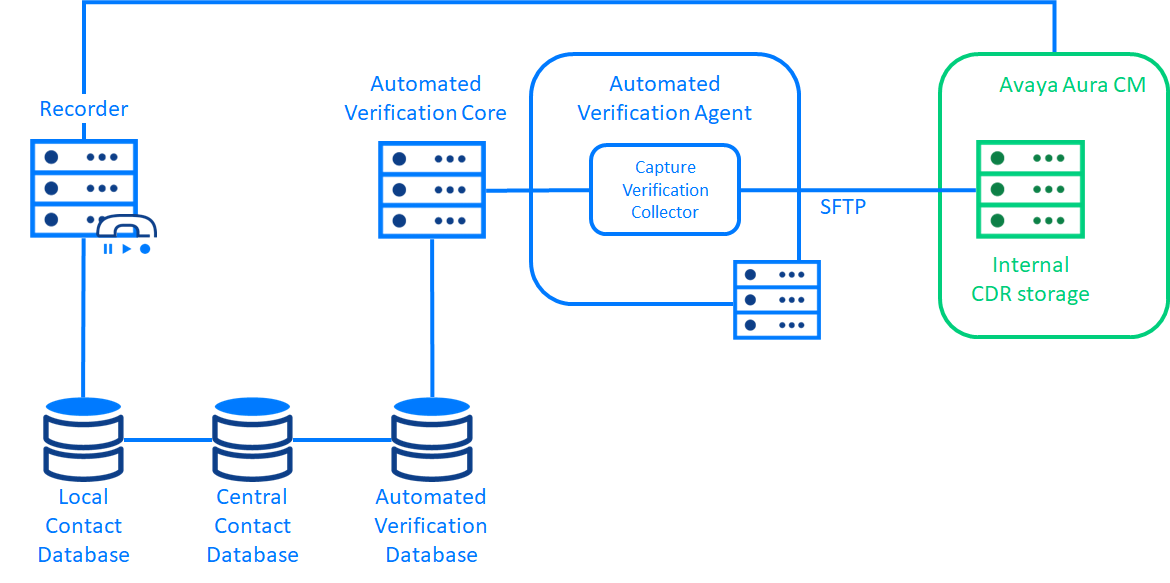
Avaya Aura CM must be configured to output CDRs to an internal data storage location. The Capture Verification Collector is configured to access this using SFTP. As Capture Verification supports the DISK method for collecting CDRs, a custom CDR format must be specified in the Avaya Aura CM administration console. The Collector then uses the connection details for the switch to connect to the internal storage of the switch and ingest the CDRs in that location by regular polling.
Set up an account for access to Avaya CDRs
Configure access to Avaya CDRs
Configure CDRs in Avaya Aura CM
Recorder Integration Service Avaya Integration Guide
Configure a Capture Verification Collector (Automated Verification Administration and User Guide)