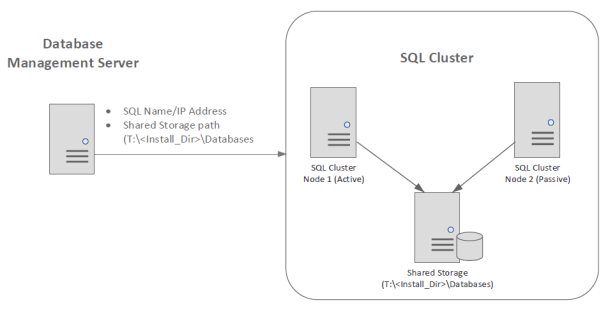
Remote SQL cluster requirements
If remote SQL Server clusters are configured, verify that the configuration meets software requirements.
|
Remote SQL Cluster |
Required configuration |
|---|---|
|
Windows 2012 64-bit Database server |
Configure as cluster. |
|
SQL Server Standard/Enterprise 2016, 2017, or 2019 64-bit |
Configure as cluster. |
|
Free disk space on the SQL cluster shared storage |
Must meet requirements in the CFE Guide. |
|
SSIS component |
Install on each SQL cluster node. On installing SQL cluster, SSIS is automatically installed only on the active node. After installation, you must manually install SSIS, Management Studio, and Development tools on every other node in the cluster. |
|
SQL service packs and hotfixes |
Install all the latest service packs and hotfixes. |
|
ServerName attribute in the SSIS configuration file |
Must point to the company-installed SQL Server instance, for remote SQL Server with multiple instances or cluster configuration. See Update ServerName attribute for multiple instances/cluster configuration of remote SQL Server. |
|
User rights assignments to SQL services account |
|
|
Database administrator permissions |
|
|
Set SQL Service accounts |
See the step related to Server Configuration > Services Accounts in the relevant SQL Server installation procedure. |
|
Create directory on cluster shared storage for Database platform installation |
The directory is used during the Database platform installation for the Database and Transaction Log directory destinations. For example:
|
|
Management Client on DBMS |
To save time on support queries for remote SQL Server deployments, install SQL Server Management Studio Express on the Database Management Server. Microsoft Download Center: SQL Server Management Studio Express |