Reset a CipherTrust license after hardware change
If the virtual machine (VM) or server hosting CipherTrust Manager is reset or reimaged, the Lock Code is regenerated. This change invalidates the original license key. To restore functionality, the license key must be reclaimed and re-issued. Work with Verint Support to obtain a new license key.
After a hardware reset, you may see a red banner or alert in the CipherTrust Manager web console indicating that the license is invalid or missing.
The Licensing page shows the license status as “Invalid” or “Unlicensed”, and features tied to the license may become unavailable.
Procedure
-
Get your sales order number.
-
Obtain the Key Manager Lock Code:
-
Sign into the CipherTrust Manager Web Interface.
-
From Admin Settings, go to Licensing, and select Lock codes.
-
Click
 to expand Key Manager Lock Code.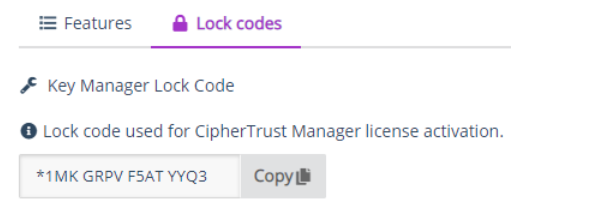
-
Copy the lock code.
This lock code is needed to activate a CipherTrust Manager license. Only one lock code is required.
-
-
Get the current license key ID:
-
Go to Admin Settings > Licensing page.
-
Locate the invalid license you want to view and click the ellipsis icon (⋮) next to it.
-
Select View/Edit from the dropdown menu.
-
In the LICENSES screen, copy the value shown in the ID column.
-
-
Contact Verint Support to request a License Key Reclaim for CipherTrust and provide the following information:
-
Current License ID (from step 3)
-
New Lock Code (from step 2)
-
Sales order number (from step 1)
-
Reason for upgrade: License key invalid after VM reimaged / hardware reset.
-
-
When you receive the license file, upload it:
-
Sign in to CipherTrust Manager Web Interface.
-
From Admin Settings, go to the Licensing page, select Add License.
-
Select Upload License and select the license file.
-
Select Add License to save the details.
-
-
Confirm that the license shows as Active.

-
Delete the old, invalid license.
CipherTrust Manager Troubleshooting
Upload CipherTrust Manager licenseCipherTrust Manager Troubleshooting
CipherTrust Deployment (Thales KMS Documentation)