Category management
Once you create categories for a project, you can manage them through the Categories list in the Analyze Content and Interaction workspaces. Manage categories by importing categories from Speech Analytics, modifying category definitions and properties, reprocessing new and updated categories, and deleting categories no longer in use.
Import categories
Import categories ( Import) from Speech Analytics that have been exported to a JSON file.
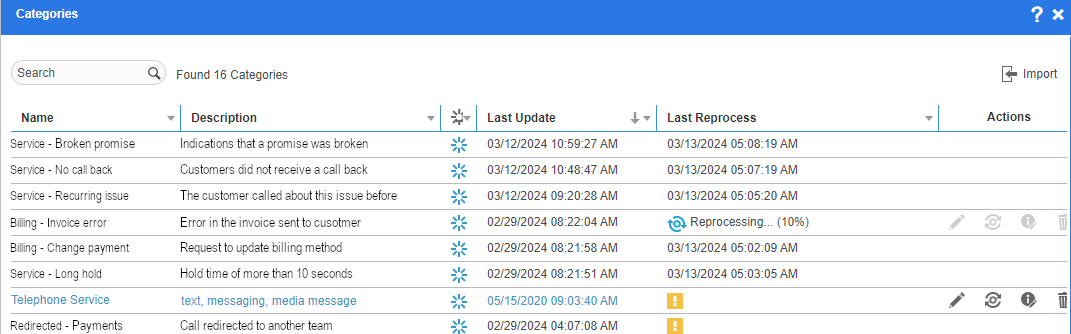
|
Category List Item |
Description |
|---|---|
|
Name |
The name of the category which is unique in the entire project. |
|
Description |
The description of the category, if defined when the category was created. |
|
State |
The state of the category, which can be one of the following:
|
|
Last Update |
The date and time when the category definitions were last modified, in the time zone of the logged-in user according to the preferences. |
|
Last Reprocess |
Can show one of the following:
|
|
Actions |
The options available to manage categories, displayed on selecting a category.
|
|
Refresh |
Updates information for all categories in the list, such as the Last Update and the Last Reprocess times. Useful if more than one user has access to the same project, and more than one user works on the same categories. |


 Reprocessing required: Indicates that the category must be reprocessed to include or exclude historical interactions to match its definitions. This status can appear for a new or existing category.
 Error while reprocessing the category: Indicates that reprocess was not completed successfully due to invalid category definitions. Review the category definitions and try again.
 : Edit category definitions.
 : Reprocess a new category or an existing category to include or exclude historical interactions that match the category definition.
 : Edit category properties, including the name, description, and the state of the category.
 : Delete category permanently from the project. Saved searches with this category will no longer return results.
Import Speech Analytics categories