Redundancy for capture from Microsoft Dynamics Omnichannel
This capture solution for Microsoft Dynamics Omnichannel supports 1 + 1 redundancy for both screen capture and call audio capture. This configuration ensures high availability and uninterrupted ingestion of media and metadata, even during failover scenarios.
Redundancy for call audio capture
The Dynamics Omnichannel Polling Adapter on the primary node queries for captured audio content from the Microsoft Dynamics Omnichannel server. Primary and Secondary nodes share download and ingestion. The node actually doing the processing always sends a watermark notification with the time of completion to the other node. During failover, the secondary node takes over the role of querying for
The data sources serve the primary and secondary Recorder nodes.
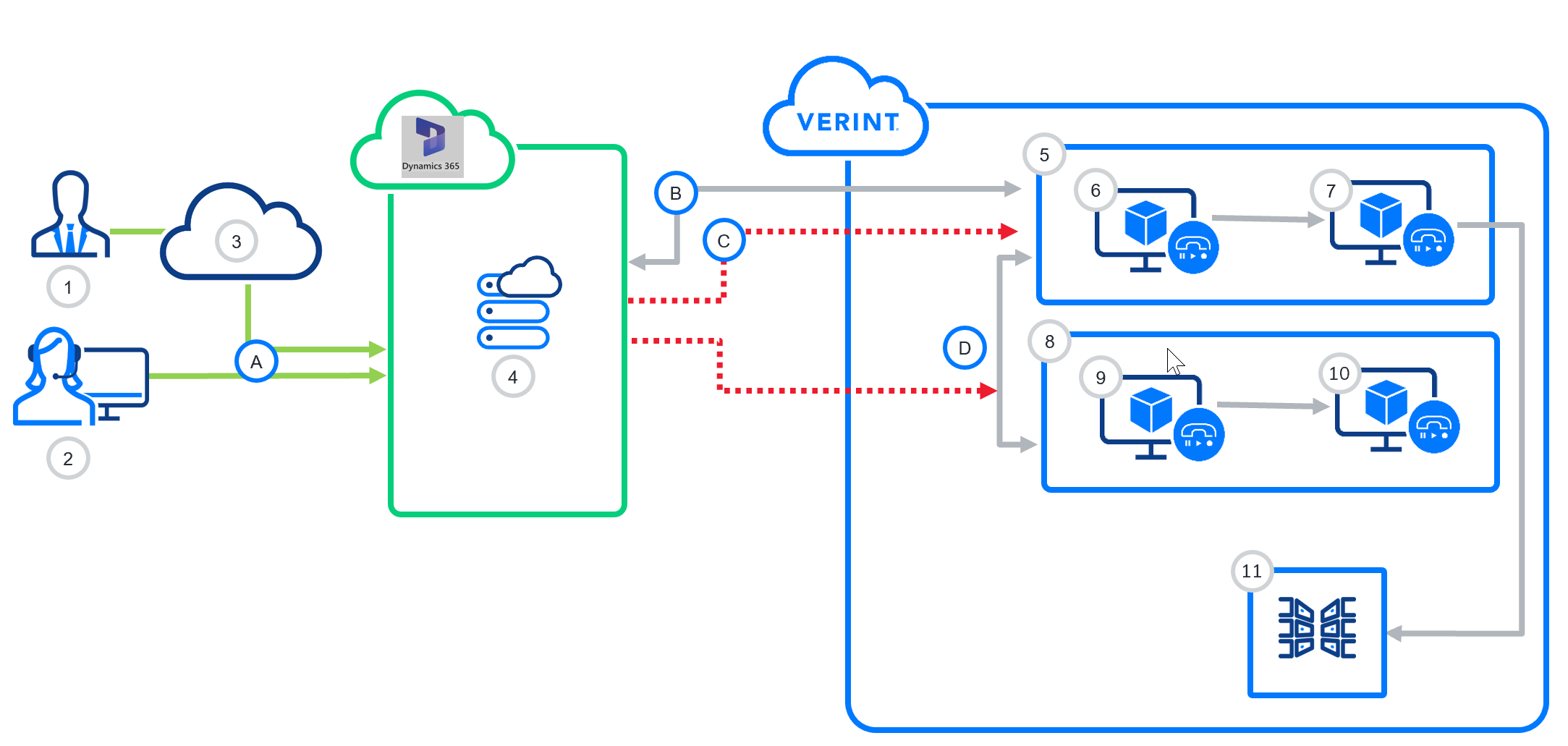
|
Components |
Communications |
|---|---|
|
|
Redundancy for screen capture
The following components are required:
-
A single Dynamics Omnichannel data source
-
A single LAN data source
-
Two recorder nodes
-
Each recorder node hosts:
-
A Recorder Integration Service (RIS)
-
A Omnichannel screen adapter
-
Webhook configuration for redundant RIS setup
To enable screen capture redundancy, configure the webhook to support both RIS nodes.
Option 1: DNS Alias or Load Balancer
-
Enter a single URL in the webhook configuration
https://verintringcentralscreenrecorder1.verintlabs.com/api/recording/cti/v1/MicrosoftDynamicsOmnichannelAdapter -
Configure the DNS alias or load balancer to route traffic to both RIS servers.
Option 2: Dual Endpoint Configuration (If Supported)
-
If multiple endpoints are supported, specify both:
Primary RIS:
https://ris-primary.contoso.com/api/recording/cti/v1/MicrosoftDynamicsOmnichannelAdapterSecondary RIS:
https://ris-secondary.contoso.com/api/recording/cti/v1/MicrosoftDynamicsOmnichannelAdapter
Integration Overview for capture from Microsoft Dynamics Omnichannel
Configure high availability (Recorder Configuration and Administration)