Firewall ports
For Verint Recorders and MS Teams to communicate, specific ports need to be open and reachable on the VM firewalls, Azure Network Security Groups, and network devices (routers, switches) in your network.
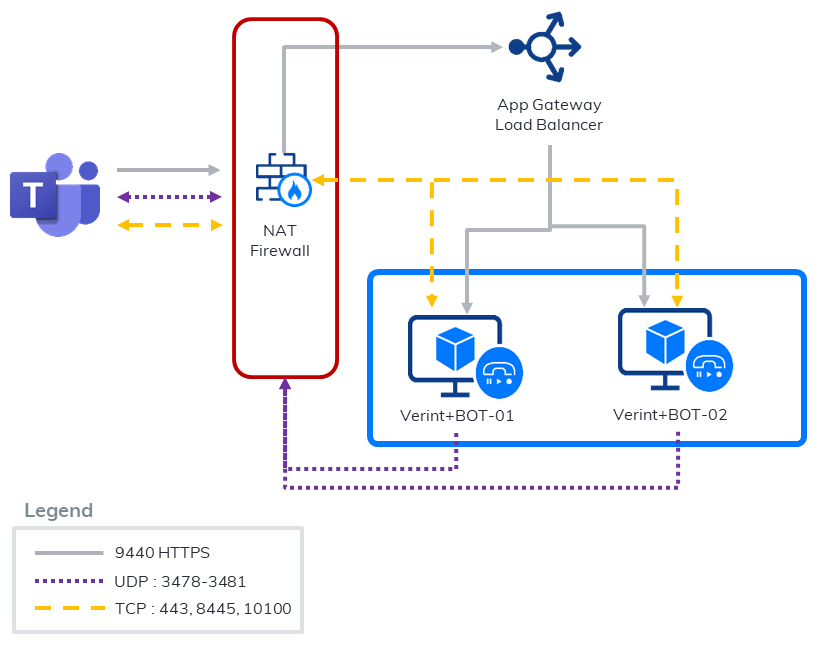
Inbound ports rules
The following table lists the inbound ports that must be open and reachable.
|
Source |
Port |
Protocol |
Function and description |
|---|---|---|---|
|
Any The source can be only restricted to Azure networks, Microsoft cannot restrict the Teams side to specific IP ranges at the moment. To download Azure IP ranges, see https://www.microsoft.com/en-us/download/details.aspx?id=56519 Make sure that the IP addresses of the VMs running the bot service are allowed.
|
443 |
TCP |
Chat |
|
8445 |
TCP |
Media control port for Teams. |
|
|
9440 |
TCP |
Call invite from MS Teams HTTPS health probe for Azure Traffic Manager and Application Gateway |
|
|
10100 |
TCP |
Call control port for MS Teams |
Outbound port rules
By default, Windows Firewall and Azure Network Security Groups allow all outbound network traffic unless it matches a rule that prohibits the traffic. If your organization's security policies require you to block ports, make sure that the following ports are open to allow Verint and MS Teams to communicate.
|
Component |
Outbound Ports (Protocol) |
Destination Ports (Protocol) |
Function and description |
|---|---|---|---|
|
Your Azure VM server that hosts the Recorder |
16384 - 65535 (UDP) |
3478 - 3481 (UDP) |
Range of ports used for media |
The Verint MS Teams Bot adapter is considered a standard Microsoft Teams endpoint. Refer to the following Microsoft documentation for a list of the required endpoints and ports which must be accessible to a Microsoft Teams endpoint: Office 365 URLs and IP address ranges (section Skype for Business Online and Microsoft Teams)
The Verint MS Teams Bot Adapter uses Microsoft Graph API over https://graph.microsoft.com/v1.0 to send requests to Azure AD for user information and to Microsoft Teams for the media stream of an interaction.
Outbound egress rules for calling BOT
|
Source |
Destination |
Role |
Dest.Port |
Protocol |
|---|---|---|---|---|
|
Your calling bot |
login.microsoftonline.com |
OAuth sign in URL |
443 |
TCP |
|
Your calling bot |
|
OAuth scope |
443 |
TCP |
Microsoft Teams integration overview
Open ports and add certificate to the VM