Open ports and add certificate to the VM
For the
Before you begin
-
Get the sign-in credentials for the Administrator user that was created when the VM was deployed.
-
Review the required Security certificate
-
Get the list of Firewall ports
Procedure
-
Using Remote Desktop, sign in to the VM.
-
Add the firewall rules:
-
Open PowerShell as an Administrator.
-
Using the New-NetFirewallRule cmdlet, add the required inbound and outbound ports.
Example:
New-NetFirewallRule -displayname 'Verint Web HTTPS' -direction inbound -action allow -protocol tcp -LocalPort 443
New-NetFirewallRule -displayname 'Verint Teams Bot Media' -direction inbound -action allow -protocol tcp -LocalPort 8445
New-NetFirewallRule -displayname 'Verint Teams Bot Signaling 1' -direction inbound -action allow -protocol tcp -LocalPort 9440
New-NetFirewallRule -displayname 'Verint Teams Bot Signaling 2' -direction inbound -action allow -protocol tcp -LocalPort 10100
-
-
To verify the firewall rules were added, run the command Get-NetFirewallRule.
-
Add the SSL certificate:
-
Open mmc.exe.
-
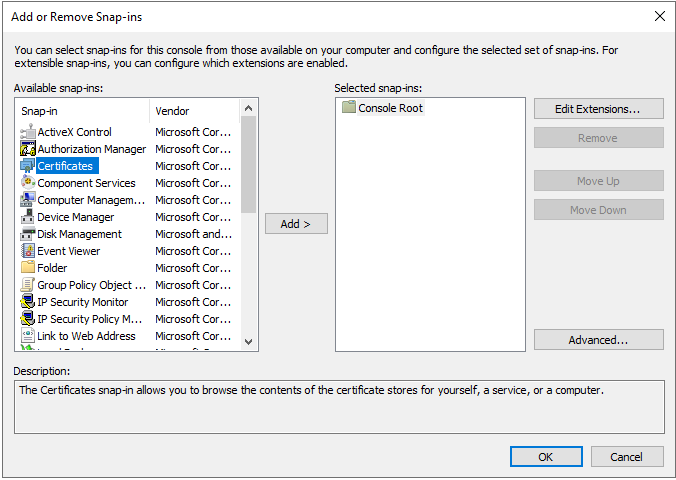
Select File > Add or remove Snap-ins (Ctrl+M).
-
From the list on the left, select Certificates, then select Add.
-
Select Computer account and Local Computer, then select OK.
-
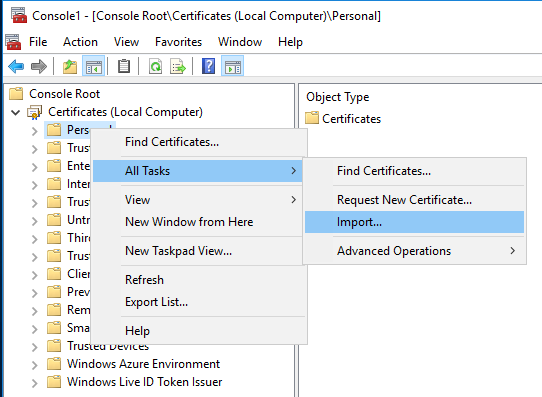
Right-click on Personal, then go to All Tasks > Import…
-
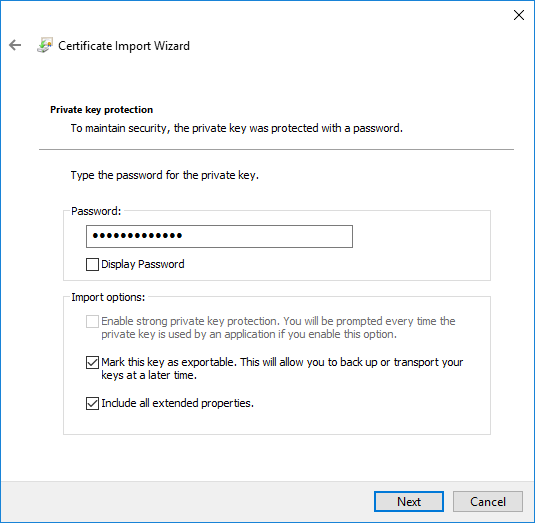
Select Next and browse for the .pfx file.
-
Type the password for the private key and select Mark this key as exportable.
-
Select Next.
-
Select Certificate store and leave the default value.
-
Select Next and Finish.
-
-
Bind the SSL certificate to the ports:
-
As an Administrator, open a Command Prompt.
-
Use the netsh http add sslcert command. This command requires the correct local IP and Certificate Thumbprint.
Parameters:
-
ipport: LocalIP:SignalingPort
-
certhash: Certificate thumbprint
-
appid: Random GUID
The following commands are required with the correct IP and Thumbprint:
netsh http add sslcert ipport=10.0.2.4:9440 certhash=1a2eef07216c06c55998ac4d30ecc2bbee44b9c9 appid={00000000-0000-0000-0000-000000000001}
netsh http add sslcert ipport=10.0.2.4:10100 certhash=1a2eef07216c06c55998ac4d30ecc2bbee44b9c9 appid={00000000-0000-0000-0000-000000000001}
-
-
What to do next
New-NetFirewallRule (Microsoft technical docs)