Configure N+N Recorder redundancy
Before you begin
Install two Recorders in your Site, and assign to each the Recorder Integration Service role and at least one Recorder role (see Set up Recorder roles and associations). You may have the Integration Service on separate servers, but they can co-exist on the same server as the Recorder.
If you require screen recording, enable Screen Recorder roles as well.
Procedure
-
In Enterprise Manager, click System Management.
-
Under Installations, locate the Recorder that will act as the Main, and click the triangle beside that node.
-
Select the IP Recorder or TDM Recorder role.
-
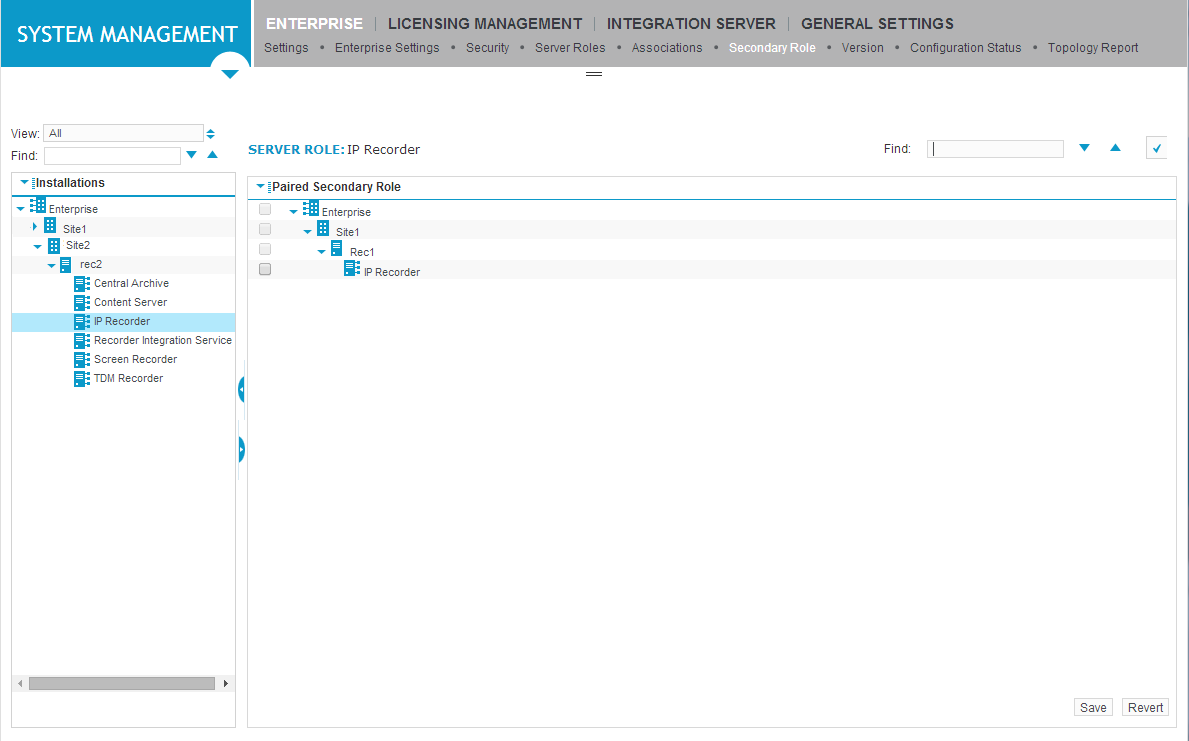
Click the Secondary Role screen. Locate the Recorder you want to act as the Backup, then select the check box beside its Recorder role (IP Recorder or TDM Recorder).
-
Click Save.
-
Select the Recorder Integration Service role under the Main Recorder.
-
Click the Secondary Role screen. Locate the Backup Recorder, then select the check box beside its Recorder Integration Service role.
-
Click Save.
-
You will now be able to see the associations for the Recorder Integration Service on the Associations and Secondary Role screens. You can see the associations for the Recorder on the Secondary Role screen.
The associations of the Main will be replicated on the Backup.
-
Configure the phone data source and assign to the main Integration Service (Create a phone data source).
-
Configure a member group and assign to the Main Recorder. These settings will be replicated on the Backup Recorder.
Refer to the following table for details about the type of member group you should create:
VoIP Interception
Primary Recorder Configuration
Supported Switch Environment
Member Group
Recorder Control Type
Avaya
IP Extension Pool
Recorder Control
Avaya NES
IP Extension Pool
CTI Control
Alcatel
IP Extension Pool
Recorder Control
Cisco
IP Extension Pool
Recorder or CTI Control
Genesys
IP Extension Pool
Recorder Control
VoIP Delivery
Primary Recorder Configuration
Supported Switch Environment
Member Group
Recorder Control Type
SIP
IP Extension Pool
Recorder or CTI Control
Avaya DMCC
Multiple Registration Extension Pool
NA
TDM Trunk
Primary Recorder Configuration
Member Group
Recorder Control Type
Compliance Trunk Span
Recorder or CTI Control
Station Tap
Primary Recorder Configuration
Member Group
Recorder Control Type
Compliance Station Extension Group
Recorder or CTI Control
-
Create phones and assign to the member group created above (Create and edit phones/extensions).
-
Complete the rest of the configuration process as described in
-
Set up recording rules (assign any rules to the primary Integration Service)
-
Restart the Integration Service. It is only necessary to restart the Recorder if you have changed its Enable Return Primary Control to Main After Recovery setting.