N+N
In N+N Redundancy, a deployment of Recorders and Integration Service servers is replicated one-for-one, creating a main system paired with a backup system. Each set of paired servers connects to the same telephony and data network infrastructure, and records the same CTI and audio data.
Each set of paired Recorders has a primary/secondary relationship. Although the main and backup servers are synchronized for recording, only one Recorder in each pair is the primary at any given time, making the other Recorder in the pair the secondary. A failure on the primary results in a reversal of roles -- the failed primary becomes the secondary and the secondary becomes the new primary.
By default, only the primary in each pair updates the databases for the recorded calls. If you need both copies marked to the database, you can enable Full Duplicate Recording, in which case both the primary and the secondary update the database for recorded calls.
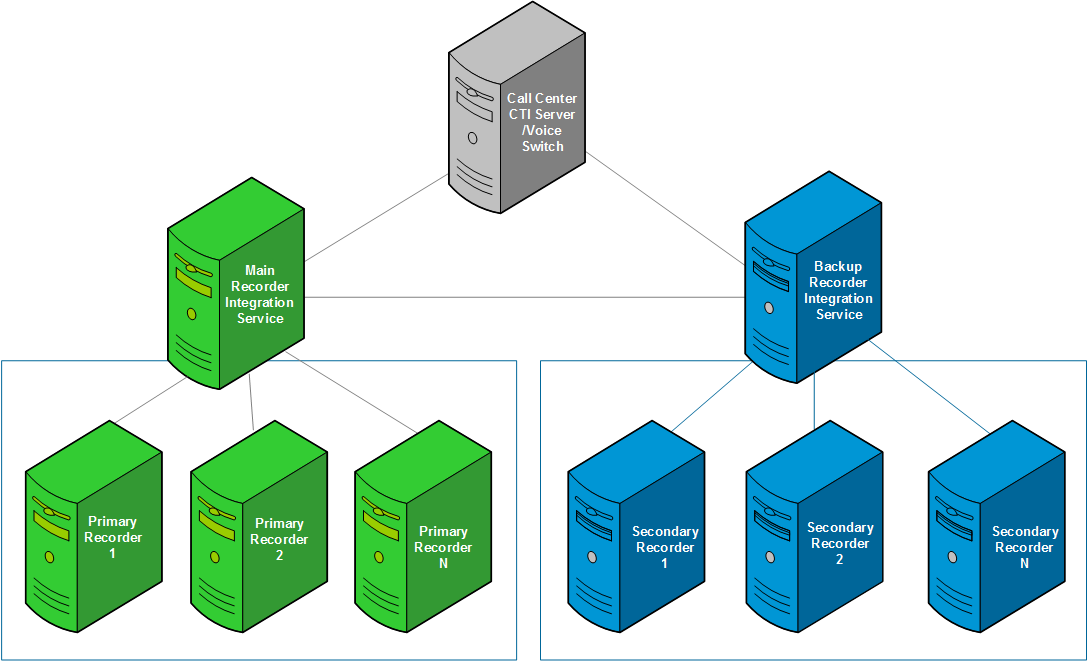
Note the following general considerations related to N + N:
-
Failover is initiated based on the state of the Recorder; that is, the state of each extension is compared to its paired extension. If there is a failure at the extension level, the extension marking switches to the paired Recorder and Integration Service.
-
The main Integration Service does not communicate with the backup Recorders. Conversely, the backup Integration Service does not communicate with the main Recorders.
-
The secondary always retains the same recordings as the primary. By default, the secondary omits the step of submitting recordings to workflow for consolidation and archiving. When Full Duplicate Recording is enabled, the secondary also submits recordings to workflow.
-
If the primary control changes, N+N rollback occurs. N+N rollback means the secondary-turned-primary submits the previous 15 minutes (default setting) of calls to the system, and all new calls from that point in time. If Full Duplicate Recording is enabled, N+N rollback does not apply.
-
Situations can arise where a call is recorded on the secondary, but not on the primary. This state is not associated with a Recorder failure, so the primary control remains with the main Recorder. Recorder-based failover marking ensures that the secondary Recorder consolidates the call when the primary has not recorded the call, despite the main retaining primary control. When the secondary records the call longer than the primary recorder both Recorders consolidate the same call.
-
The redundancy controller prevents more than three switchovers on the same pair of channels/extension within a one-minute time period.
-
When a channel moves from primary to secondary, an alarm appears in the Enterprise Manager. You can view the state of each channel/extension, whether primary or secondary, in Recorder Manager.
-
All parts of contacts that start on the primary and fallback to the secondary (that is, even non-ended interactions or segments) are kept.
-
When the IP Capture service is restarted on any Recorder from an N+N pair, all Extensions will become primary on both main and backup Recorders of that N+N pair. Until the primary control status of these Extensions is identified by the Redundancy Controller, the recordings from both recorders will be marked to the database. By default, the Redundancy Controller takes 30 seconds to decide primary control status of the Extensions on these recorders. This is configurable through the FailoverMapsCompareWaitTime configuration parameter of the RecorderGeneral.xml file.
-
IP video recording is not supported for N+N.
Supported environments
N+N supports the following recording environments:
-
Passive TDM recording
-
Station Side
-
Trunk Side
-
-
VoIP Interception
-
Signaling environments
-
RTP-based recording
-
With or without load balancers
-
Full Duplicate Recording
When Full Duplicate Recording is enabled, recordings from both the primary and the secondary Recorder are consolidated to the database. Use of this feature, especially applicable in compliance recording environments, provides even more robust redundancy and increased visibility for every interaction recorded by both the main and the backup systems.
The feature pairs recordings from the primary and the secondary. Access to the paired recordings is available for interaction replay and for Archive:
-
Interaction replay: By default, only interactions from the primary recorder are shown. If a user requests interactions from the secondary recorder, pairs of interactions are shown and available for replay.
-
Archive: Configure which interactions campaigns use. For example, create a campaign to archive only primary recordings to a medium reserved for the main system. Then create a second campaign to archive only secondary recordings to a medium reserved for the backup system.
How to configure Full Duplicate Recording
Configure Full Duplicate Recording on each phone data source by selecting Keep duplicate recording. The feature is disabled by default. See the related topics section to learn more.
Effect on database size and Archive media
Load balancing in N+N
Load balancing is accomplished by distributing calls across multiple data centers/gateways, over the public network but managed by a single distributed PBX. In this configuration, it is possible to set up N + N with an N- main and a backup Recorder in each data center. When using a load balancer in N+N, you must ensure that the same signaling and media are presented to each Recorder in any N pair identically. The media must also be unique to that pair, and not presented to any other pair of Recorders. The collective channel count at each data center must be less than the channel count of a single Recorder. (Also note the particular member group settings required in the configuration section that follows.)
There are challenges inherent in configuring an external load balancing device to guarantee that each N pair of recorders receive identical signaling and media. Do not proceed with such an implementation if meeting this requirement is not possible.
If you can meet this requirement, and the required channel count is more than a single Recorder can accommodate, then you can use shared interception. Shared interception does, however, introduce a dependency on CTI. The Integration Service must be available for recording to occur.
Configure N+N Recorder redundancy
Disable recording-based failover marking
Performance and Sizing Guidelines