Map meta data to custom attribute
To make the data related to a custom attribute available in Verint applications and reports, create a custom attribute, and then map the attribute to a custom field.
Service providers add custom attributes to the adapter.
Before you begin
-
Log into Enterprise Manager using a system account for service providers.
-
If not already done, Create the Conversocial Polling Adapter
-
If not already done, Map attribute to custom field
Procedure
-
Get the name of the tag from the list of attributes.
-
If the tag is not listed, you can find it in the interaction capture log.
-
To open any Interaction Capture log on the Recorder server: go to
$:\Impact360\Data\Logs\, and open theinteractioncapture_yyyy_mm_dd_#.logfile in a text editor.The log name includes the following variables:
yyyyis the year,mmis the month,ddis the day, and#is the sequential number for that log file. -
Find an
IEMessagestructure for Conversocial, and look forFolder <event>. -
Extrapolate the external name of a tag using the event values. Use the format
event.*.*(recursively to any level) for the value.Example:
You want to make the tag
customer_nameavailable in Risk Management. The Interaction Capture log might look like the following. We've highlighted the relevant tags.[IEMessage |E284|H] 2022-11-10 22:34:23.162-08:00 Int<AdapterId> = 1 ; Str<AdapterName> = ConversocialAdapter ; Int<SwitchId> = 51 ; Str<SwitchName> = ConversocialDS
[IEMessage |E284|H] 2022-11-10 22:34:23.162-08:00 Folder<event>
[IEMessage |E284|H] 2022-11-10 22:34:23.162-08:00 Str<CHAT_ID> = 634fe51f604165a8104d6d6b ; Str<SourcePlatform> = FACEBOOK ; Bool<first_conversation_message> = false ; Bool<last_conversation_message> = false ; Long<TEXT_CREATION_TIME> = 1666180377000 ; Bool<PUBLIC_ONLY> = true ; Str<TO_ROLE> = info
[IEMessage |E284|H] 2022-11-10 22:34:23.162-08:00 Str<TO_USER> = f:Mr Clownface Stores_257940A1A39514E102119341DA3F3E41 ; Str<TO_DISPLAY_NAME> = f:Mr Clownface Stores ; Str<FROM_USER> = f:Ananth Ganapathiraman_99838B56CBB126C63BB839AE332163A2 ; Str<FROM_DISPLAY_NAME> = f:Ananth Ganapathiraman
[IEMessage |E284|H] 2022-11-10 22:34:23.162-08:00 Str<FROM_ROLE> = visitor ; Str<TEXT> = Hi, I'm replying to your post on Facebook. Did you find what you what you were looking for? ; Int<SESSION_INDEX> = 1 ; Str<customer_name> = f:Ananth Ganapathiraman
The external tag name is
event.customer_name, and it is a string (Str).
-
-
Map the third-party external tag name to a custom attribute on the Adapter.
-
In System Managment, under Enterprise, select Settings, under Installations, select the recorder node that hosts the Conversocial data source and adapter, then click Launch.
-
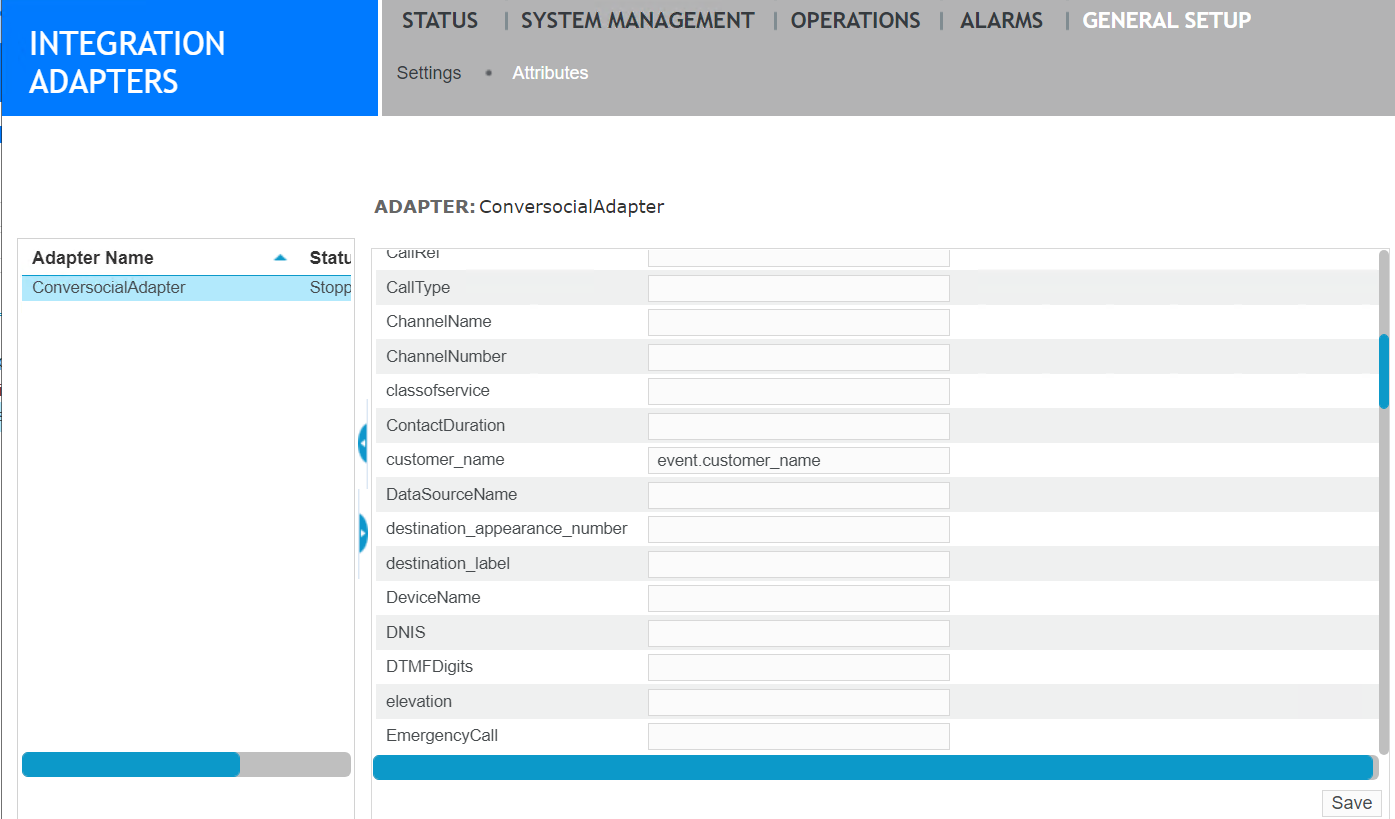
In Recorder Manager, go to General Setup, under Integration Adapters, click Attributes.
-
Under Adapter Name, select the Conversocial Polling Adapter.
-
In the Adapter pane, find the custom attribute created previously by the customer, or create one now.
-
In the External Name field, enter the name of the tag from the external system.
-
Click Save.
-
-
Click Save.
What to do next
Search and replay interactions
-
Search result columns (Risk Management Administration and User Guide)
-
Create, edit, or delete an attribute (Recorder Configuration and Administration Guide)
-
For all rules governing the External Name field, including cases where the external attribute consists of a list of values, see "Attribute external name syntax" in the Recorder Configuration and Administration Guide.