Create the Zoom Archive Polling Adapter
The Zoom Archive Polling Adapter connects the Interaction Capture Service to Zoom Meetings, and receives events, meeting video, screen shares and chat from Zoom Meetings.
Before you begin
Procedure
-
In Recorder Manager, go to General Setup. Under Integration Service, click Settings.
-
Click Create, then select Zoom Archive Polling Adapter.
-
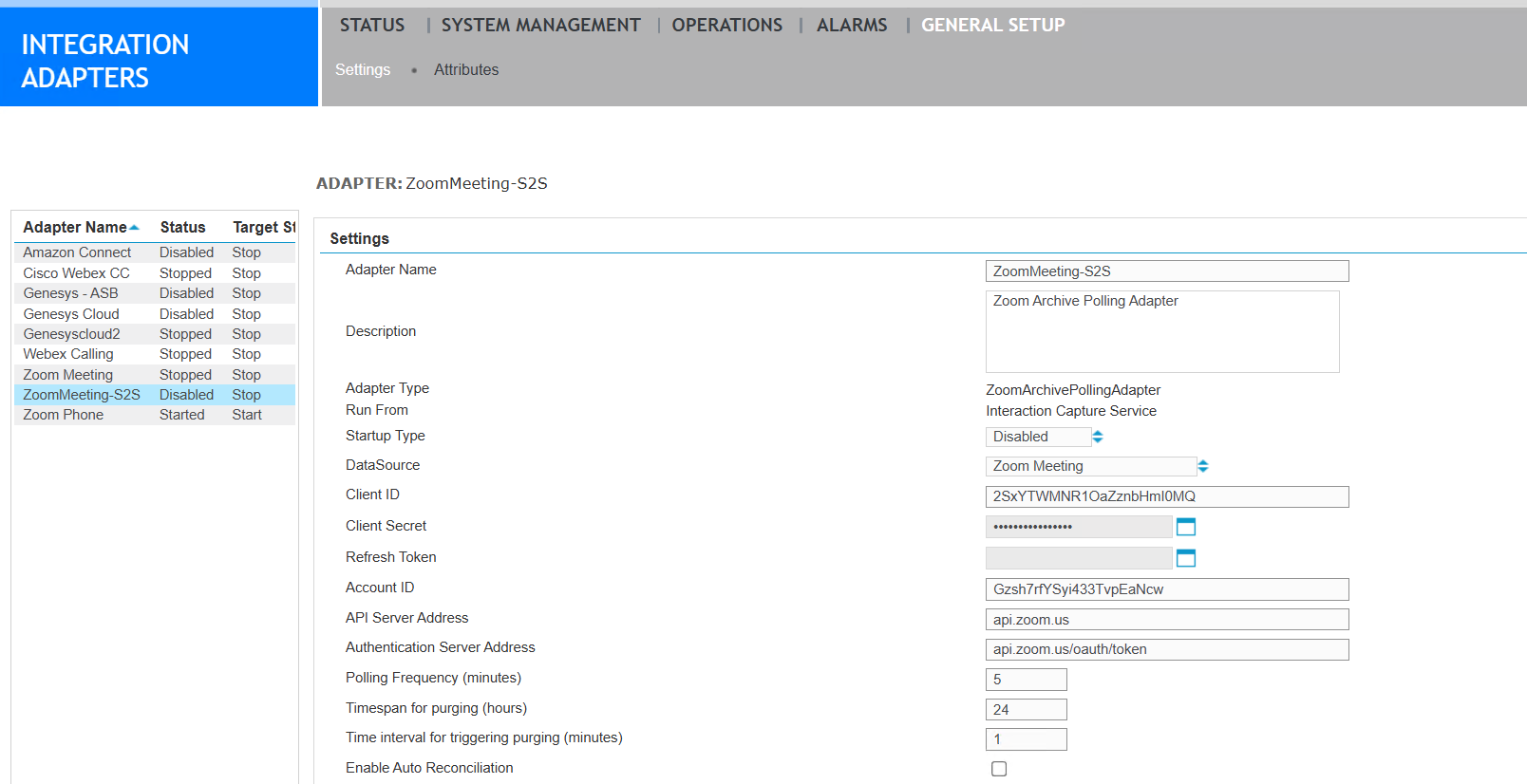
Complete the adapter settings:
-
Optional. Under Advanced Settings
-
Ensure the valid range is 0 to 60.
-
If the key is not specified, it defaults to 7 days.
-
If invalid data is entered, it defaults to the maximum value of 60 days.
-
-
Click Save.
-
If you have a secondary Recorder, repeat this procedure to create another Adapter.
|
Field |
Description |
|---|---|
|
Adapter Name |
A unique name for this adapter. Do not use any special characters or characters that truncate xml. This field is not case-sensitive. |
|
Description |
A description of the adapter (optional). |
|
Adapter Type |
A read-only field that lists the adapter selected previously. |
|
Startup Type |
Startup types are Automatic, Manual, or Disabled. |
|
DataSource |
The Application data source that you previously created for Zoom. |
|
Client ID |
The Client ID generated when you created the Zoom OAuth App. This ID allows the adapter to use the Zoom API. |
|
Client Secret |
The generated secret that corresponds to the Client ID. |
|
Refresh Token |
The refresh_token from the Access Token response that you generated previously, using information from your Zoom OAuth App. The integration refreshes the Access Token automatically from this point on. (If you create an access token elsewhere, the one generated in the integration becomes void, and you must replace this refresh_token and restart the adapter.) The users should begin migrating to the solution using the Account ID. |
|
Account ID |
The account ID for the tenant’s account in the Zoom platform. |
|
API Server Address |
The API endpoint destination, api.zoom.us. |
|
Authentication Server Address |
Address used to refresh authentication status of the adapter, api.zoom.us/oauth/token. |
|
Polling Frequency (minutes) |
Time intervals in minutes at which polling for completed meetings occurs, over the configured polling window. The default is 5. |
|
Timespan for purging (hours) |
A timespan, in hours, for purging. The system purges data older than the specified time. The default is 1. Example: If you set the Timespan for purging to 4, all data older than 4 hours is purged when the Time interval for triggering purging setting is triggered. |
|
Time interval for triggering purging (minutes) |
This setting defines how often to check for data to be purged. The default is 1. |
What to do next